Ctrl+Everything: The Americans Who Threw Away Their Mice and Never Looked Back
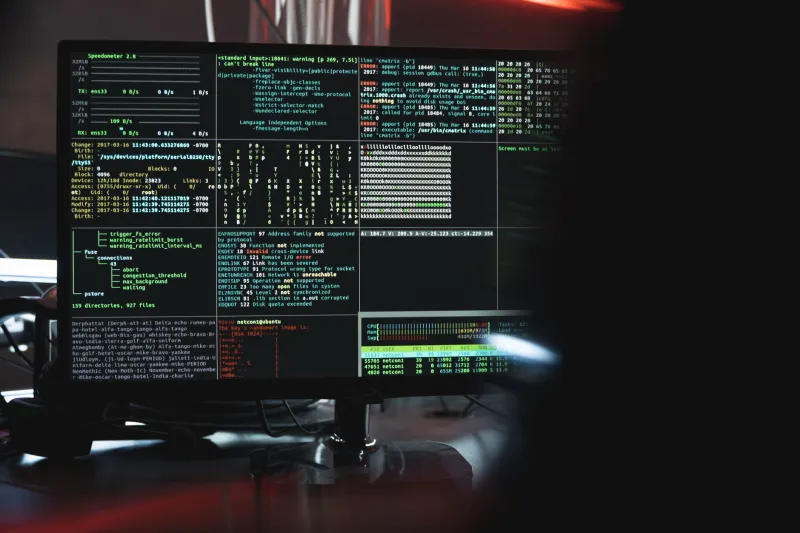
Somewhere in a Denver apartment, Marcus Webb is writing a report, sending emails, managing files, and running database queries — all without once reaching for a mouse. His desk is clean. Disturbingly clean. Just a mechanical keyboard, a dark terminal window, and a guy who looks genuinely at peace with his computer.
"People watch me work and they think something's broken," he says. "Like I'm stuck in some error screen. But I'm moving faster than they are."
Marcus is part of a loosely connected, largely self-taught subculture of command-line devotees who have stripped their computing experience down to raw text input. No icons. No drag-and-drop. No right-click menus. Just a cursor blinking in a black box, and the knowledge to make it do almost anything.
Who These People Actually Are
Forget the stereotype. Yes, plenty of them run Linux. But the command-line faithful aren't exclusively software engineers or IT guys with basement server racks. They're copywriters who use Vim to edit documents. Graphic designers who batch-process image files through shell scripts. Financial analysts who pull data through terminal-based tools faster than any Excel ribbon ever allowed.
Jamila Torres, a freelance journalist in Chicago, switched to a keyboard-first workflow three years ago after burning out on what she calls "click fatigue."
"I was constantly hunting through menus, losing my train of thought every time I had to grab the mouse," she says. "The GUI was supposed to make things easier, but for me it was just... interruption. Constant, low-grade interruption."
She now uses a combination of tmux, Neovim, and a handful of command-line utilities to handle everything from research organization to final drafts. Her mouse sits in a drawer. She's not sure where exactly.
The Case Against Point-and-Click
The graphical user interface — the desktop, the icons, the windows you drag around — was designed to lower the barrier to computing. And it worked. Brilliantly. The mouse made computers accessible to people who had no interest in learning syntax or memorizing commands. That was the whole point.
But accessibility and efficiency aren't the same thing, and that distinction is at the core of why keyboard-first users defected.
When you use a GUI, you're operating within a framework someone else designed. You can only click what's clickable. You can only access what's been surfaced in a menu. The interface is, by definition, a curated set of choices — and curation always means exclusion.
The command line doesn't curate. It exposes. Every function the software can perform is available, not just the ones a product team decided deserved a button. For users who hit those invisible GUI ceilings regularly, the terminal isn't a step backward. It's a door opening.
"The mouse gives you what they want you to have," says Derek Osei, a systems administrator in Atlanta. "The terminal gives you what's actually there."
The Learning Curve Is Real — And That's the Point
Here's the honest part: this is not easy to get into. The command line does not forgive typos graciously. It does not offer undo buttons or helpful pop-ups. Early mistakes can feel catastrophic — and occasionally are. More than one person in this community has a story about accidentally deleting something important during their first week.
Jamila spent two months feeling slower and more frustrated before she crossed what she now calls "the threshold" — the point where muscle memory kicks in and the syntax stops feeling like a foreign language.
"It's like touch-typing," she says. "You feel stupid and slow until suddenly you don't, and then you can't imagine going back."
That learning curve is, paradoxically, part of the appeal for some users. In a tech culture obsessed with frictionless onboarding and zero-effort interfaces, choosing something difficult on purpose is its own kind of statement. It signals commitment. It filters out casual use. And it creates a level of competence that feels genuinely earned.
This isn't masochism — it's investment. Every hour spent learning a command pays dividends for years.
What They Actually Gain
Speed is the most obvious benefit, and it's real. Keyboard shortcuts eliminate the physical travel time of moving a hand to a mouse and back. Scripted commands can automate tasks that would take dozens of clicks. Workflows that once required multiple open applications collapse into a single terminal window.
But the users we talked to kept coming back to something less quantifiable: focus.
"When your whole interface is a text prompt, there's nothing to distract you," Marcus says. "No notification badges. No sidebar widgets. No temptation to drag a window around for ten minutes instead of working. It's just you and the task."
That cognitive clarity — the absence of visual noise — turns out to matter a lot for people who spend eight or more hours a day in front of a screen. The terminal is, in a strange way, a minimalist's paradise.
There's also the portability argument. Command-line tools work consistently across machines, operating systems (with some variation), and time. Software learned in the terminal in 2005 often still works in 2025. Compare that to the GUI apps that get redesigned, deprecated, or paywalled every few years, and the terminal starts to look less like a relic and more like a foundation.
Is This for Everyone?
No. And most command-line users will tell you that directly.
For someone who uses a computer to browse, stream, and occasionally send an email, the return on investment just isn't there. The GUI does that job fine, and there's no shame in it.
But for people who live in their computers — who spend most of their working hours manipulating files, writing text, running processes, managing data — the keyboard-first approach isn't a quirky hobby. It's a serious reconsideration of how a tool should fit a human being.
"I'm not trying to recruit anyone," Jamila says. "I just know that my work got better when I stopped letting the interface make decisions for me."
That's the No Grip version of it, really. Not a manifesto. Just a choice to grab the controls directly — no handle, no wrapper, no intermediary layer between you and the machine.
The mouse will be fine without you.